Managing Coin Packages
This guide explains how to manage coin packages in the admin panel. Coin packages allow users to purchase virtual currency (coins) that can be used to unlock premium content on the platform.
Accessing the Coin Packages Section
- Log in to the admin panel with your administrator credentials
- Navigate to the Settings section in the sidebar
- Click on Coin Packages to access the coin package management interface
Viewing Coin Packages
The Coin Packages page displays a table with all coin packages in the system. The table includes the following information:
- Name: The display name of the coin package
- Credits: The number of coins included in the package
- Price: The cost of the package
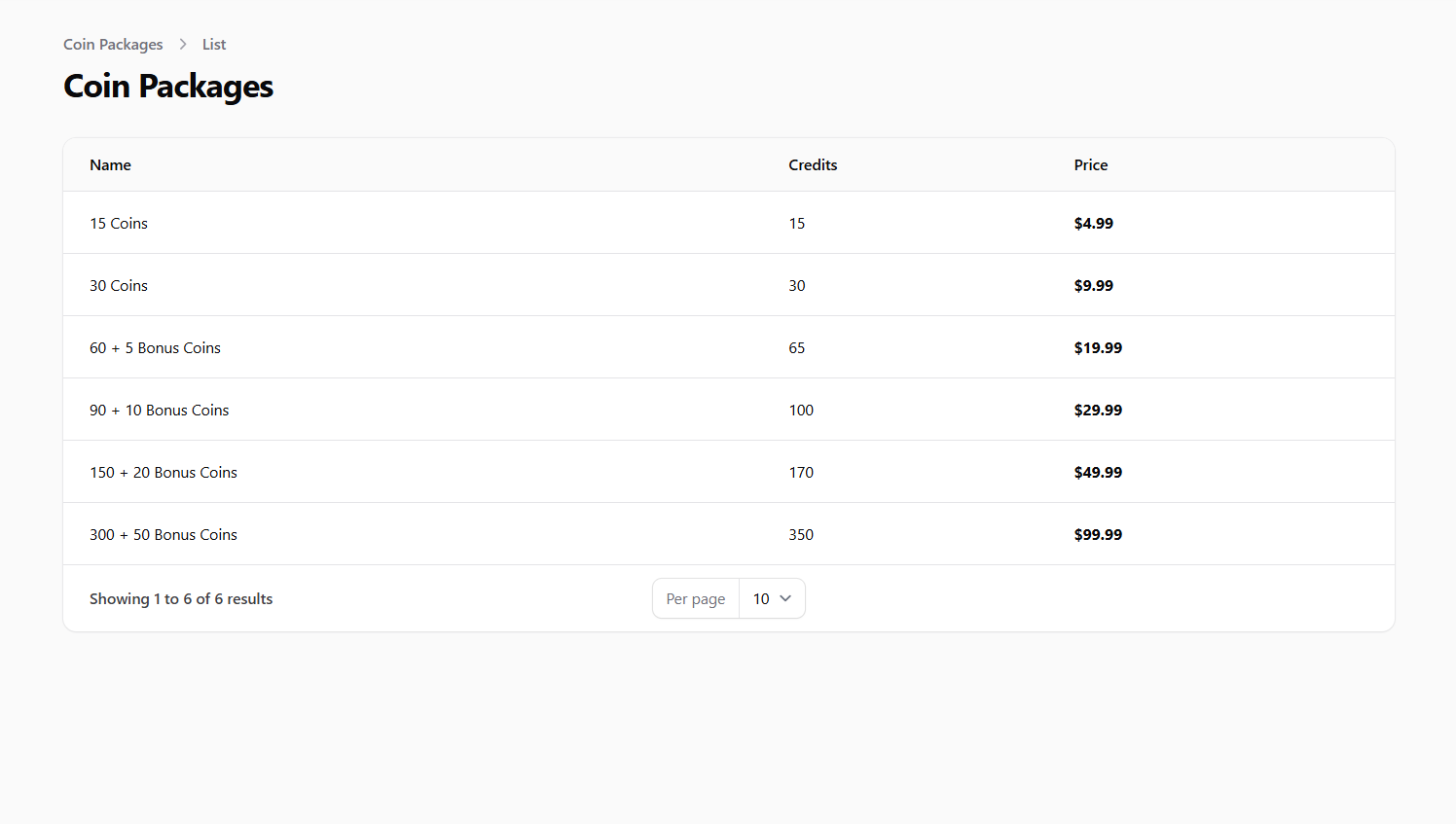 Screenshot: Coin packages list view
Creating a New Coin Package
To create a new coin package:
- Click the New Coin Package button at the top of the Coin Packages page
- Fill in the required information:
- Name: Enter a descriptive name for the package (e.g., "Starter Pack", "Premium Bundle")
- Credits: Enter the number of coins included in the package
- Price: Set the price for the package (note: prices are stored in cents, so $9.99 would be entered as 999)
- Click Create to add the new coin package
 Screenshot: Create coin package form
Understanding Coin Package Usage
Coin packages are used by readers to purchase virtual currency that can be spent on:
- Unlocking Premium Chapters: Readers can use coins to access individual chapters that require payment
- Tipping Artists: Readers can send coins to artists as tips to show appreciation for their work
- Other Premium Features: Depending on your platform configuration, coins may be used for additional premium features
Monitoring Coin Purchases
To monitor coin purchases and usage:
- Navigate to the Payments section in the sidebar
- Look for reports or widgets that show:
- Total coin purchases
- Most popular coin packages
- Coin usage patterns
This information can help you optimize your coin package offerings and pricing.
Best Practices
- Value Scaling: Offer better value (more coins per dollar) for larger packages to encourage bigger purchases
- Clear Naming: Use descriptive names that clearly communicate the value proposition
- Strategic Pricing: Set price points that are attractive to users (e.g., $4.99, $9.99, $19.99)
- Package Variety: Offer a range of packages at different price points to accommodate different user budgets
- Regular Review: Periodically review purchase patterns and adjust offerings as needed
- Promotional Packages: Consider creating limited-time special packages for promotions or events
Important Notes
- Coin packages, once created, are typically not edited or deleted to maintain purchase history integrity
- The system stores prices in cents (1/100 of the currency unit) but displays them in the standard currency format
- Ensure that coin packages provide clear value to users to encourage purchases